All Insights / Low-Code/No-Code vs. Custom Development: How to Choose the Right Approach in 2026
Low-Code/No-Code vs. Custom Development: How to Choose the Right Approach in 2026
A practical comparison of low-code, no-code, and custom software development, helping businesses evaluate speed, cost, scalability, flexibility, and long-term needs to choose the right approach in 2026.
Low code & no code vs custom development
Low-code and no-code platforms help businesses launch applications faster and at a lower initial cost, making them ideal for MVPs, internal tools, and process automation. Custom development provides greater flexibility, ownership, security, and scalability, making it better suited for complex products and long-term growth. For many organizations, the best solution is not choosing one approach over the other, but understanding when each delivers the most value.
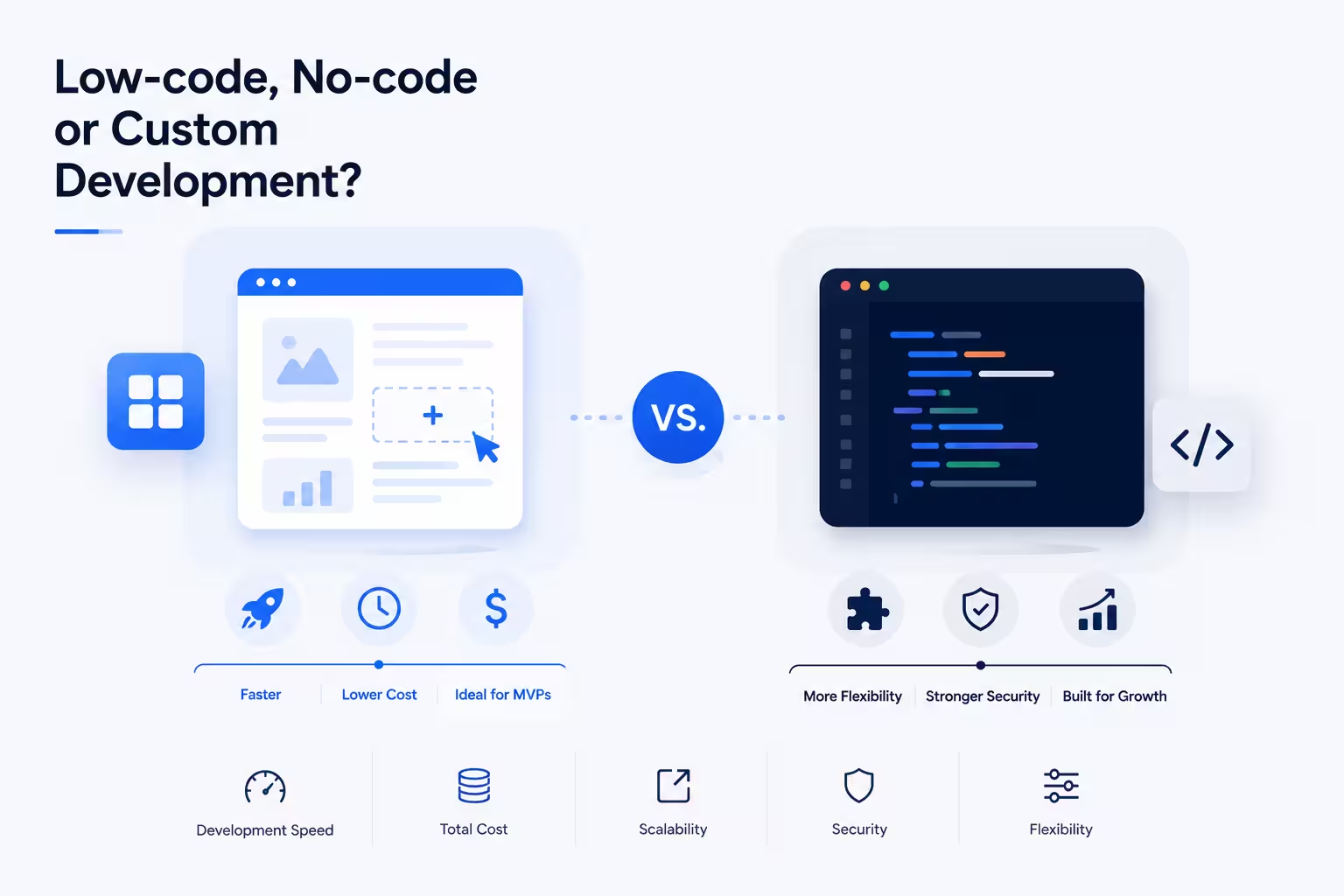
For many organizations, it's no longer a purely technical decision. The choice directly affects development speed, scalability, security, long-term costs, and ultimately the ability to adapt as the business grows.
Low-code and no-code platforms have become increasingly popular because they allow teams to launch applications faster and with fewer technical resources. What once required months of development can now be accomplished in days or weeks using visual builders, pre-built components, and AI-powered tools. As a result, startups, small businesses, and enterprise teams alike are exploring ways to reduce development time and accelerate delivery.
At the same time, custom development remains the preferred option for organizations that need greater flexibility, deeper integrations, stronger security controls, or highly specialized functionality. While it typically requires a larger upfront investment, it offers a level of ownership and scalability that many businesses eventually need as their products and operations become more complex.
The conversation has become even more interesting with the rise of AI-assisted development. According to the GitHub Copilot study, developers using AI assistance completed tasks 55.8% faster than those working without it. As AI continues to reshape software delivery, the line between traditional development and low-code approaches is becoming increasingly blurred.
The challenge is that there is no universally correct answer. The right approach depends on factors such as business goals, technical requirements, available resources, growth expectations, compliance needs, and long-term strategy.
In this guide, we'll compare low-code, no-code, and custom development across the areas that matter most: cost, speed, scalability, security, flexibility, and total cost of ownership. We'll also explore the hidden trade-offs, common mistakes, and decision frameworks that can help organizations choose the right approach for both their current needs and future growth.
What Are Low-Code, No-Code, and Custom Development?
Before comparing the advantages and limitations of each approach, it's important to understand what they actually mean. While low-code, no-code, and custom development all aim to create software applications, they differ significantly in how those applications are built, maintained, and scaled over time.
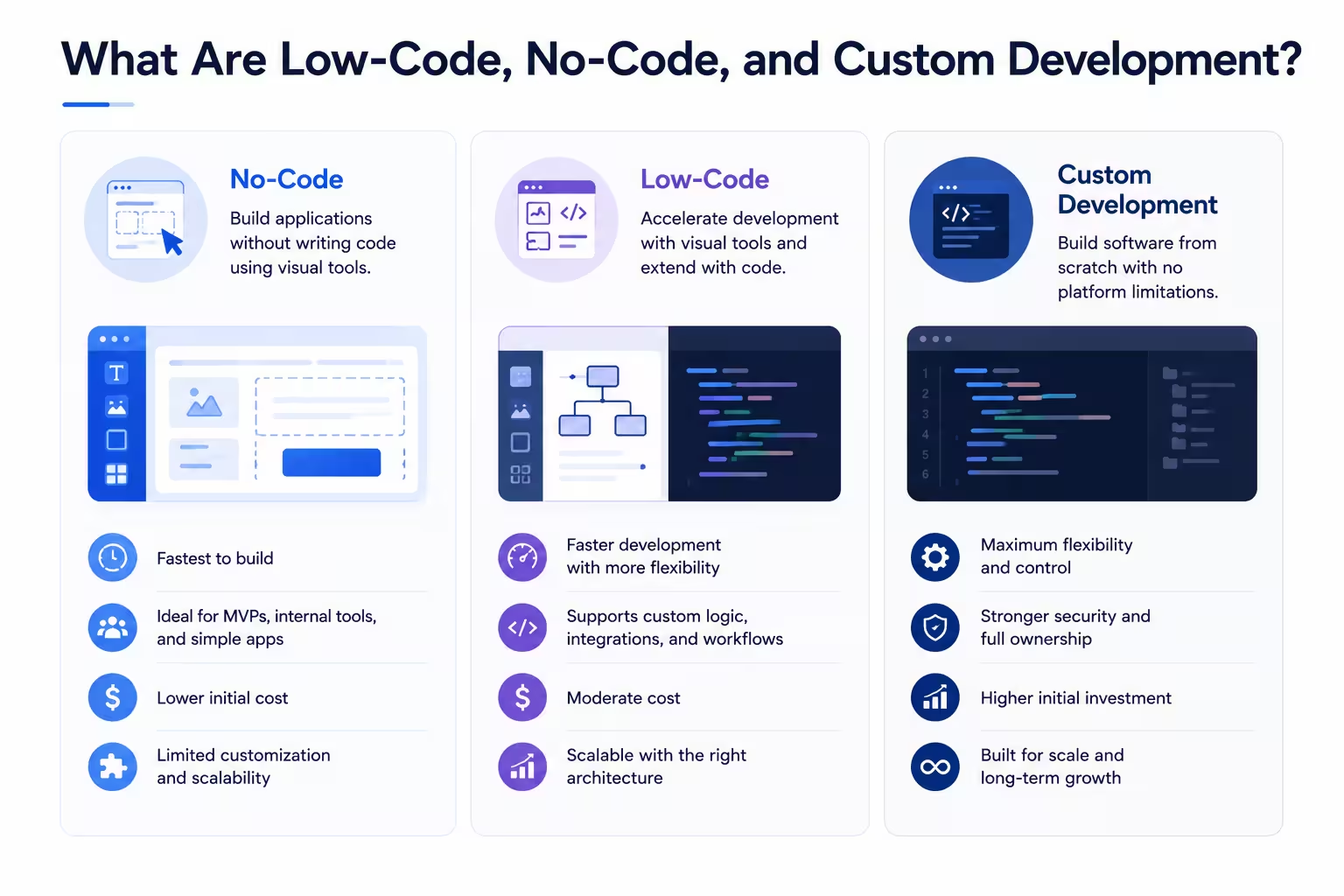
What Is No-Code?
No-code development allows users to build applications without writing any code. Popular no-code platforms include Webflow for websites, Bubble for web applications, and Glide for mobile and internal business apps. Instead of programming features from scratch, users work with visual interfaces, drag-and-drop components, pre-built templates, and configuration tools.
The primary goal of no-code platforms is accessibility. They enable non-technical users to create websites, internal tools, workflows, customer portals, and simple business applications without relying heavily on software developers.
For example, a marketing team might use a no-code platform to build a lead management system, while a small business owner could create a customer booking application without hiring a development team.
The biggest advantage of no-code development is speed. Applications can often be built and deployed quickly, making no-code an attractive option for startups, prototypes, and internal business tools.
However, that simplicity comes with trade-offs. Because users are limited to the features, integrations, and customization options provided by the platform, complex requirements can quickly become difficult to implement.
What Is Low-Code?
Low-code development sits between no-code platforms and traditional software engineering.
Platforms such as Microsoft Power Apps, Mendix, OutSystems, and Retool are designed to accelerate development through visual builders while still allowing developers to extend functionality with custom code.
Like no-code tools, low-code platforms provide visual builders, reusable components, and pre-configured functionality that accelerate development. The difference is that developers can extend these platforms with custom code when needed.
This additional flexibility makes low-code suitable for more sophisticated applications that require custom business logic, integrations, security configurations, or specialized workflows.
For example, a company might use a low-code platform to rapidly build a customer portal while using custom code to connect the application with internal databases, third-party services, or legacy systems.
Many organizations view low-code as a way to balance speed and flexibility. Development is often faster than building everything from scratch, while still allowing technical teams to customize critical areas of the application.
What Is Custom Development?
Custom development involves building software from the ground up using programming languages, frameworks, and development tools selected specifically for the project.
Unlike low-code and no-code platforms, custom development places no predefined limitations on functionality, architecture, integrations, or scalability. Every aspect of the software can be designed around the organization's unique requirements.
This approach is commonly used for SaaS products, enterprise platforms, customer-facing applications, data-intensive systems, and software that plays a central role in a company's competitive advantage.
Custom development typically requires more time, technical expertise, and upfront investment than low-code or no-code alternatives. However, it provides complete ownership, greater flexibility, and the ability to evolve the software without being constrained by the capabilities of a third-party platform.
For organizations with complex requirements or long-term growth ambitions, that flexibility often becomes one of the most valuable advantages of custom development.
The Key Differences at a Glance
Choosing between no-code, low-code, and custom development often comes down to balancing speed, cost, flexibility, and long-term scalability. While all three approaches can help organizations build software, they serve very different business needs.
The table below summarizes the key differences:
Criteria | No-Code | Low-Code | Custom Development |
|---|---|---|---|
Speed | Fastest deployment, often days or weeks | Faster than traditional development, typically weeks | Longest timelines, often months depending on complexity |
Cost | Lowest upfront cost | Moderate upfront cost | Highest upfront investment |
Flexibility | Limited to platform capabilities | Moderate to high flexibility through custom code extensions | Virtually unlimited flexibility |
Security | Dependent on platform features and configurations | Greater control, but still influenced by platform limitations | Full control over security architecture and compliance requirements |
Integrations | Limited to supported integrations | Supports custom integrations and APIs | Fully customizable integrations with any system or service |
Scalability | Suitable for smaller applications and simpler use cases | Can support growing businesses with proper architecture | Designed to scale according to business requirements |
Ownership | Platform owns the underlying technology | Partial dependency on the platform provider | Full ownership and control of the software stack |
The key question isn't which approach is universally better. It's which approach best aligns with your current goals, technical requirements, budget, and long-term growth plans.
Where Low-Code and No-Code Shine
While low-code and no-code platforms are often compared to custom development, they were never designed to replace every type of software project. Their real strength lies in helping organizations move quickly, reduce development bottlenecks, and empower teams to solve business problems without waiting months for a traditional development cycle.
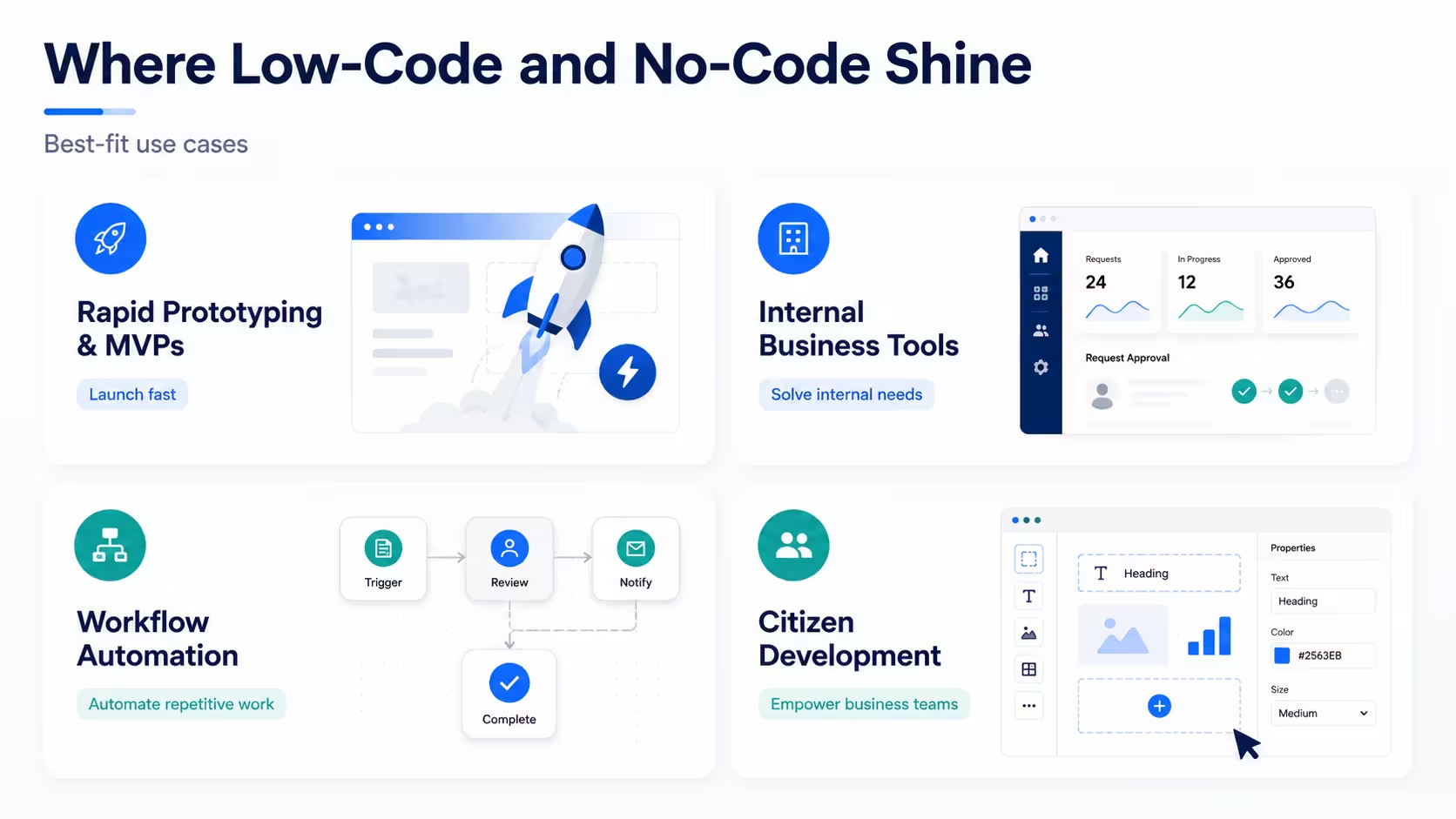
In the right scenarios, these platforms can deliver significant value.
Rapid Prototyping and MVPs
One of the biggest advantages of low-code and no-code development is speed.
For startups and product teams, validating an idea quickly is often more important than building a perfect solution. Before investing substantial time and resources into custom development, businesses need to understand whether customers actually want the product.
Low-code and no-code platforms make it possible to launch minimum viable products (MVPs), test new concepts, gather user feedback, and iterate rapidly. Features that might take weeks to build through traditional development can often be assembled in a matter of days using pre-built components and visual workflows.
For example, startups often use platforms such as Bubble or Webflow to validate ideas quickly before investing in fully custom software development.
This allows organizations to reduce risk, accelerate learning, and make more informed product decisions before committing to larger investments.
Internal Business Tools
Many business applications don't require enterprise-grade architecture or highly customized functionality.
Departments often need simple tools to manage requests, track inventory, organize internal data, handle approvals, or improve reporting processes. Historically, these needs would either remain unresolved or compete for attention with larger IT initiatives.
Tools such as Retool and Microsoft Power Apps are commonly used to build internal dashboards, approval systems, reporting tools, and operational workflows without requiring a full development project.
Low-code and no-code platforms allow teams to create these solutions quickly without consuming valuable engineering resources.
Instead of waiting for a development backlog to clear, operations, HR, finance, and customer support teams can often deploy functional internal applications themselves. This helps organizations solve operational problems faster while allowing software developers to focus on more strategic initiatives.
Workflow Automation
Many repetitive business processes still rely on spreadsheets, emails, and manual data entry.
Low-code and no-code platforms are particularly effective at automating these workflows. Businesses can connect systems, trigger notifications, route approvals, synchronize data between applications, and eliminate routine administrative tasks without building custom software from scratch.
Common examples include:
Employee onboarding workflows
Lead management processes
Customer support ticket routing
Approval and compliance workflows
Automated reporting and data collection
For organizations looking to improve efficiency, workflow automation is often one of the fastest ways to generate measurable value from low-code and no-code platforms.
Citizen Development
One of the most significant drivers behind the growth of low-code and no-code platforms is the rise of citizen development.
The concept, widely discussed by Gartner, refers to business users creating applications and automations without relying entirely on professional software developers. Instead of submitting requests to IT and waiting weeks or months for implementation, teams can build solutions directly using visual development tools.
This approach helps organizations respond more quickly to business needs while reducing pressure on engineering teams. Marketing departments can create campaign management tools, HR teams can automate onboarding processes, and operations teams can develop internal dashboards without requiring extensive coding expertise.
Citizen development doesn't eliminate the need for software engineers. Rather, it allows technical teams to focus on complex, high-value initiatives while empowering business users to solve smaller operational challenges independently.
When implemented with proper governance and oversight, low-code and no-code platforms can significantly increase organizational agility and accelerate innovation across multiple departments.
Where Custom Development Delivers Greater Value
Low-code and no-code platforms can solve many business challenges efficiently, but they are not the ideal solution for every situation. As requirements become more complex, organizations often discover that speed and simplicity are no longer the most important considerations.
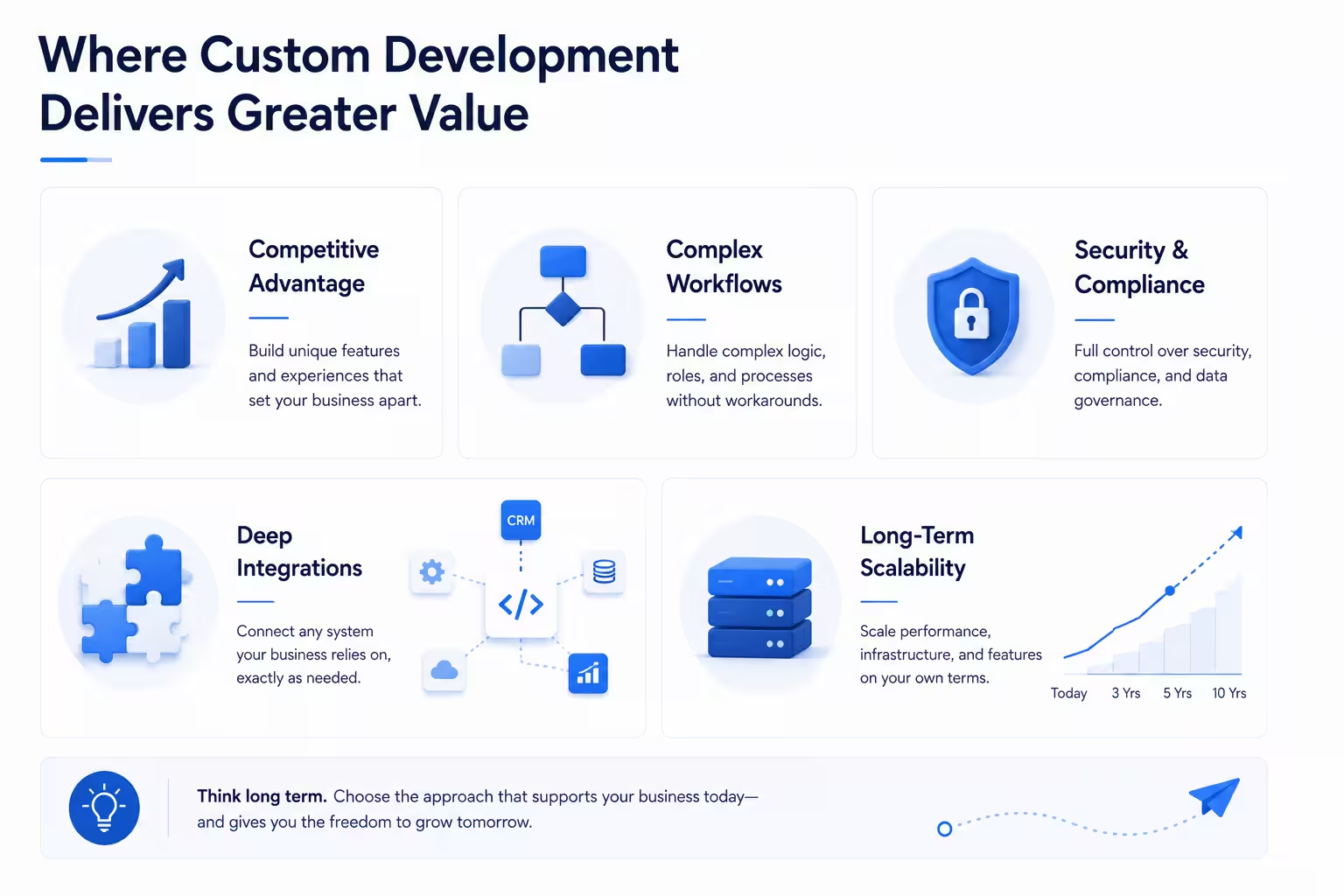
When software becomes a core part of a company's operations, customer experience, or competitive strategy, custom development often delivers greater long-term value.
Competitive Advantage
Some software simply supports a business. Other software helps define it.
For organizations operating in competitive markets, unique workflows, customer experiences, and proprietary processes can become significant differentiators. In these situations, relying on the same components and templates available to every other business may limit innovation.
Custom development allows organizations to build features, experiences, and capabilities that directly support their strategic goals. Instead of adapting business processes to fit the constraints of a platform, the software is designed around the business itself.
This level of flexibility becomes particularly valuable for SaaS companies, digital products, and organizations that view technology as a driver of growth rather than simply an operational tool.
Organizations investing in custom software development often do so because they need capabilities that cannot be easily replicated through off-the-shelf solutions or visual development platforms.
Complex Workflows
Most low-code and no-code platforms perform well when processes are relatively straightforward.
Challenges emerge when businesses need to support highly specialized workflows, multiple user roles, complex business logic, advanced reporting, or sophisticated approval processes.
For example, a healthcare provider may need to manage sensitive patient workflows, regulatory requirements, and integrations across multiple systems. A logistics company may require advanced routing algorithms, real-time tracking, and operational optimization features. A SaaS platform may need highly customized subscription logic, permissions, and data processing capabilities.
As complexity increases, organizations often find themselves creating workarounds to overcome platform limitations. Over time, these workarounds can become difficult to maintain and may introduce unnecessary operational risk.
Custom development eliminates many of these constraints by allowing software architecture and functionality to be tailored to specific business requirements from the beginning.
Security and Compliance
Security requirements vary significantly between organizations and industries.
For businesses operating in regulated environments, compliance obligations often extend beyond the capabilities provided by standard low-code and no-code platforms. Industries such as healthcare, finance, insurance, and government frequently require specialized security controls, auditing mechanisms, data residency requirements, and access management policies.
With custom development, organizations have full control over how security is implemented, monitored, and maintained.
This control allows teams to build security frameworks that align with both industry regulations and internal governance requirements. Rather than relying solely on platform-level protections, businesses can implement security measures designed specifically for their risk profile and operational environment.
For organizations handling sensitive data, this flexibility can be a decisive factor when choosing between platform-based solutions and custom software.
Deep Integrations
Modern businesses rarely operate with a single application.
Most organizations rely on a combination of CRM systems, ERP platforms, accounting software, data warehouses, marketing tools, customer support platforms, and industry-specific solutions.
While low-code and no-code platforms typically offer pre-built integrations, they may not support every system a business relies on. Even when integrations exist, they may not provide the level of flexibility needed for complex workflows or data synchronization requirements.
Custom development removes these limitations by enabling organizations to create integrations tailored to their existing technology ecosystem.
This becomes especially important for businesses working with legacy systems, proprietary databases, industry-specific platforms, or large volumes of operational data.
Rather than adapting business processes to fit available integrations, custom software can be designed to connect systems exactly as required.
Long-Term Scalability
One of the biggest differences between low-code platforms and custom development often becomes visible only after a company starts growing.
An application that works well for a small team may face challenges as user numbers increase, data volumes grow, and operational requirements become more demanding. Performance bottlenecks, platform restrictions, and escalating licensing costs can gradually reduce the benefits that initially made low-code attractive.
Custom development provides greater control over infrastructure, architecture, performance optimization, and future expansion. Organizations can scale systems according to their own priorities rather than the limitations of a third-party platform.
At higroup, one of the most common challenges we see is companies reaching a point where platform limitations start slowing growth rather than accelerating it. What initially feels like a fast and cost-effective solution can eventually become a constraint when business requirements evolve.
This doesn't mean every organization should start with custom development. However, businesses with ambitious growth plans should carefully evaluate not only their current needs but also where they expect their software to be in three, five, or even ten years.
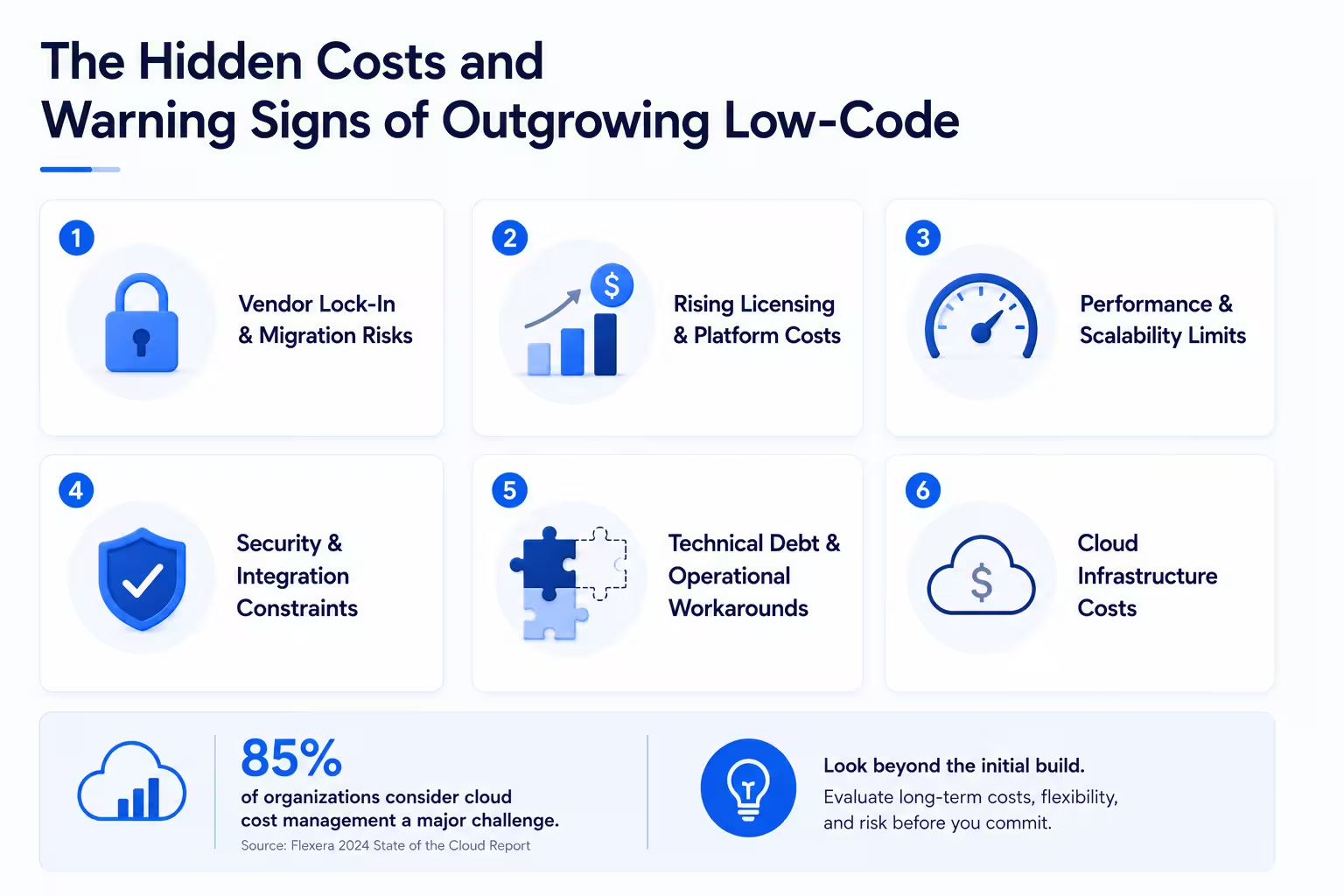
The Hidden Costs and Warning Signs of Outgrowing Low-Code
When organizations compare low-code, no-code, and custom development, the discussion often focuses on initial development costs.
How much will it cost to build?
How long will it take?
How many developers will we need?
These are important questions, but they only tell part of the story.
In many cases, the biggest financial and operational challenges emerge after an application has already been launched. As businesses grow, hidden costs, platform limitations, and increasing complexity can gradually reduce the advantages that initially made low-code attractive.
Recognizing these warning signs early can help organizations make better long-term technology decisions before growth, productivity, or customer experience are affected.
Vendor Lock-In and Migration Challenges
One of the most overlooked risks associated with low-code and no-code platforms is vendor lock-in.
When an application is built on a proprietary platform such as OutSystems, Mendix, or Microsoft Power Apps, the organization becomes increasingly dependent on that platform's ecosystem, pricing model, roadmap, and technical limitations. Over time, switching to another solution can become significantly more difficult.
This dependency is not necessarily a problem during the early stages of a project. However, as applications become more deeply embedded into daily operations, the cost and complexity of moving away from a platform can grow substantially.
Eventually, some organizations outgrow the capabilities of their chosen platform. When that happens, migration often involves far more than simply moving data. Teams may need to rebuild workflows, recreate integrations, redesign business logic, retrain users, and validate critical business processes.
For this reason, organizations should evaluate not only the cost of building a solution today, but also the potential cost of replacing it in the future.
Rising Licensing and Platform Costs
Many low-code and no-code platforms appear highly cost-effective when teams are small.
The challenge often emerges as adoption increases.
Pricing models commonly scale based on factors such as:
Number of users
Data storage
API requests
Workflow executions
Advanced functionality
Premium integrations
What begins as a relatively modest monthly expense can evolve into a significant operational cost as the organization grows.
Many organizations are surprised by how quickly platform costs increase once applications become business-critical and user adoption expands. At a certain point, continuing to pay increasing licensing fees may become less economical than investing in a solution that the organization fully owns and controls.
This doesn't mean rising costs automatically justify a migration. However, they should be evaluated alongside the value the platform continues to provide.
Performance and Scalability Limitations
Low-code platforms often perform exceptionally well during the early stages of a project.
However, as applications grow, so do expectations.
An internal tool that initially supported a small team may eventually need to handle thousands of users, larger datasets, more transactions, and increasingly complex workflows. At this stage, performance issues can begin to emerge.
Response times may become slower, reports may take longer to generate, and certain workflows may struggle under heavier usage.
While many platforms continue to perform well at scale, organizations have limited control over the underlying architecture. This can make optimization more difficult compared to custom-built applications, where infrastructure and performance can be tailored to specific business requirements.
For businesses with ambitious growth plans, scalability should be evaluated from the outset rather than after bottlenecks begin to appear.
Security and Integration Constraints
As organizations grow, their security and integration requirements often become more sophisticated.
What was acceptable during the early stages of a business may no longer be sufficient when handling sensitive customer information, financial records, healthcare data, or regulated workloads.
Organizations may eventually require:
Advanced access controls
Custom authentication methods
Detailed audit logging
Data residency controls
Industry-specific compliance measures
While many low-code platforms provide strong security capabilities, they may not support every governance or compliance requirement an organization needs to implement.
The same challenge often appears with integrations.
A platform that initially connected easily with a CRM and a handful of business tools may struggle when organizations need to integrate with legacy systems, proprietary applications, industry-specific software, or highly customized internal platforms.
When security requirements and integration needs start exceeding platform capabilities, it is often a strong indicator that the business is approaching the practical limits of the platform.
Technical Debt and Operational Workarounds
Perhaps the clearest sign that a business has outgrown low-code is the accumulation of workarounds.
A platform selected for simplicity can gradually become more complex as teams attempt to accommodate new requirements. Additional integrations are added. External scripts are introduced. Manual processes fill gaps. Multiple tools become interconnected in ways that were never originally intended.
Over time, these decisions create a form of technical debt.
The application still functions, but maintaining it becomes increasingly difficult. New features take longer to implement, troubleshooting becomes more complicated, and operational risks begin to increase.
Ironically, a solution originally chosen for its simplicity can become increasingly difficult to manage if the platform is no longer aligned with business requirements.
When a platform requires constant workarounds to support core business processes, the issue is often no longer a lack of creativity. It is a sign that the software has reached the limits of what it was designed to do.
Cloud Infrastructure Costs
Cloud infrastructure is another area where costs are frequently underestimated.
Many organizations focus heavily on development expenses while paying less attention to the ongoing operational costs required to run and support applications. As software usage grows, cloud spending can increase significantly through hosting, databases, storage, networking, monitoring tools, and AI-related workloads.
Managing these expenses has become a growing challenge for organizations of all sizes. According to the Flexera report, 85% of organizations still consider cloud cost management a major challenge.
This highlights an important reality: software costs don't end when development is complete.
Whether an organization chooses low-code, no-code, or custom development, long-term operational expenses should be evaluated alongside development costs. Looking only at the initial build cost can create an incomplete picture of the true investment required to support software over time.
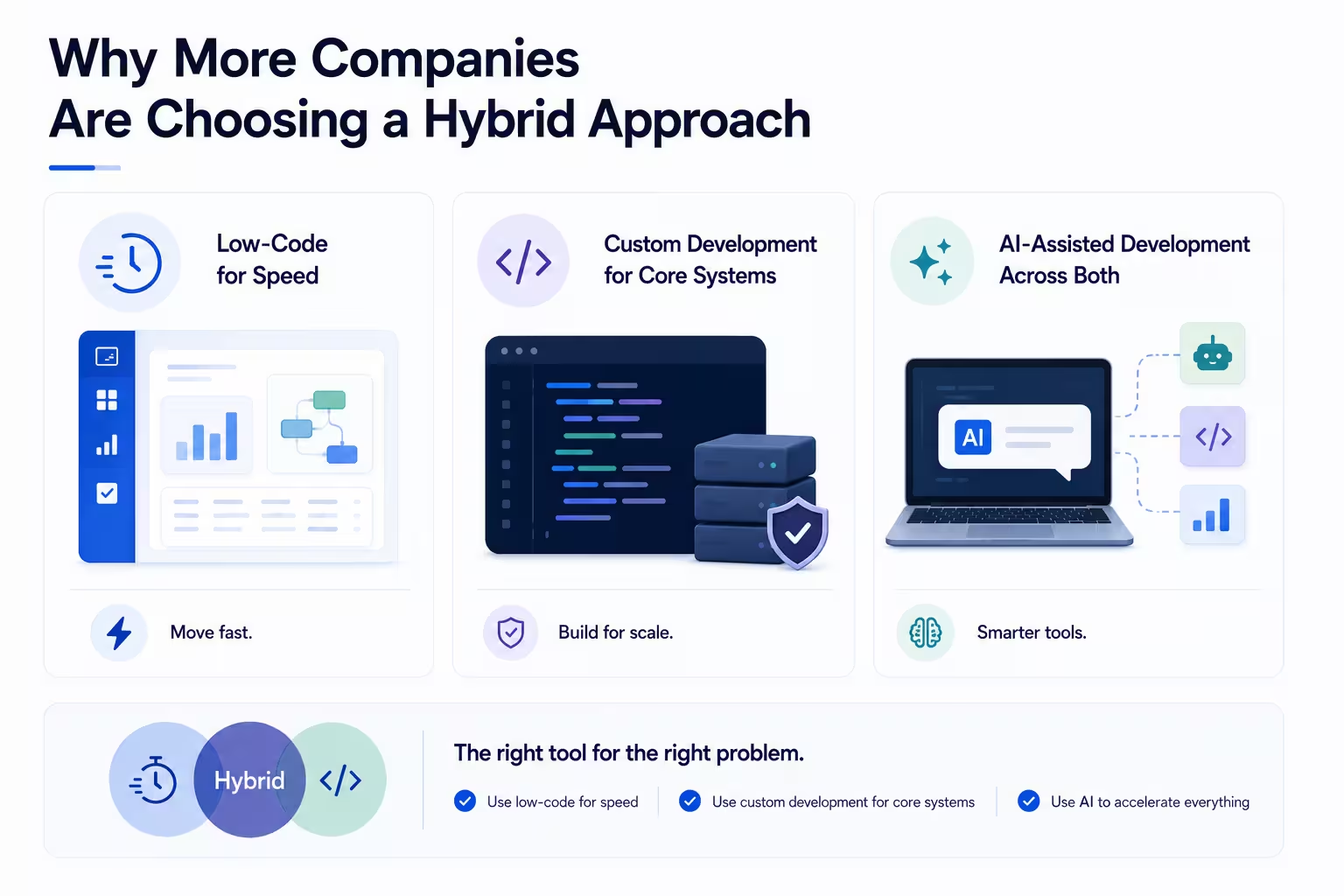
Why More Companies Are Choosing a Hybrid Approach
The discussion around low-code, no-code, and custom development is often framed as a choice between competing approaches.
Should you choose low-code or custom development?
Should you prioritize speed or flexibility?
Should you build or configure?
In reality, many organizations are discovering that the best answer is not one approach or the other. Instead, they are combining multiple development methods to take advantage of the strengths of each.
As software ecosystems become more complex and business requirements evolve more quickly, hybrid development strategies are becoming increasingly common.
Low-Code for Speed
There are many situations where building everything from scratch simply doesn't make sense.
Internal dashboards, workflow automations, approval systems, reporting tools, and operational applications can often be delivered much faster using low-code platforms. These tools allow organizations to move quickly, experiment with new ideas, and solve business problems without lengthy development cycles.
For many teams, speed is a competitive advantage in itself.
Platforms such as Retool, Mendix, Microsoft Power Apps, and OutSystems allow organizations to build operational applications significantly faster than traditional development approaches.
Rather than waiting months for a solution, departments can launch useful applications in weeks and begin creating value almost immediately. This makes low-code particularly effective for projects where time-to-market is a higher priority than complete customization.
Custom Development for Core Systems
At the same time, not every system should be built on a low-code platform.
Applications that directly impact revenue, customer experience, intellectual property, or competitive differentiation often require a greater degree of control and flexibility.
These systems frequently include:
Customer-facing platforms
SaaS products
Enterprise applications
Industry-specific solutions
Data-intensive systems
Mission-critical business processes
For these use cases, custom development provides the scalability, ownership, and architectural freedom needed to support long-term growth.
This is why many organizations reserve custom development for their most strategic systems while using low-code tools to accelerate less critical initiatives.
Rather than replacing custom development, low-code often complements it.
AI-Assisted Development Across Both
The rise of AI is adding another layer to this conversation.
Historically, low-code platforms were viewed as the fastest way to build software, while custom development offered greater flexibility at the cost of longer delivery timelines.
Today, AI-assisted development is helping narrow that gap.
Developers can use AI tools to accelerate coding, generate documentation, automate testing, create prototypes, and streamline repetitive tasks. At the same time, many low-code platforms are integrating AI-powered capabilities that make application creation even faster and more accessible.
As a result, the distinction between low-code and custom development is becoming less rigid than it once was.
Organizations are increasingly combining AI-assisted development, low-code platforms, and custom software engineering within the same technology strategy.
The result is a more pragmatic approach to software delivery. Rather than committing entirely to a single methodology, businesses can select the right tool for each problem they are trying to solve.
In many cases, the future of software development is not low-code versus custom development. It is knowing when and how to use both effectively.
How AI Is Changing the Low-Code vs. Custom Debate
Artificial intelligence is reshaping software development at a remarkable pace.
Just a few years ago, discussions around low-code and custom development focused primarily on development speed, cost, and technical complexity. Today, AI is changing the economics of software delivery across both approaches.
As AI-powered tools become more capable, organizations are rethinking how applications are built, who can build them, and how development resources should be allocated. The result is a more nuanced conversation than the traditional low-code versus custom development debate.
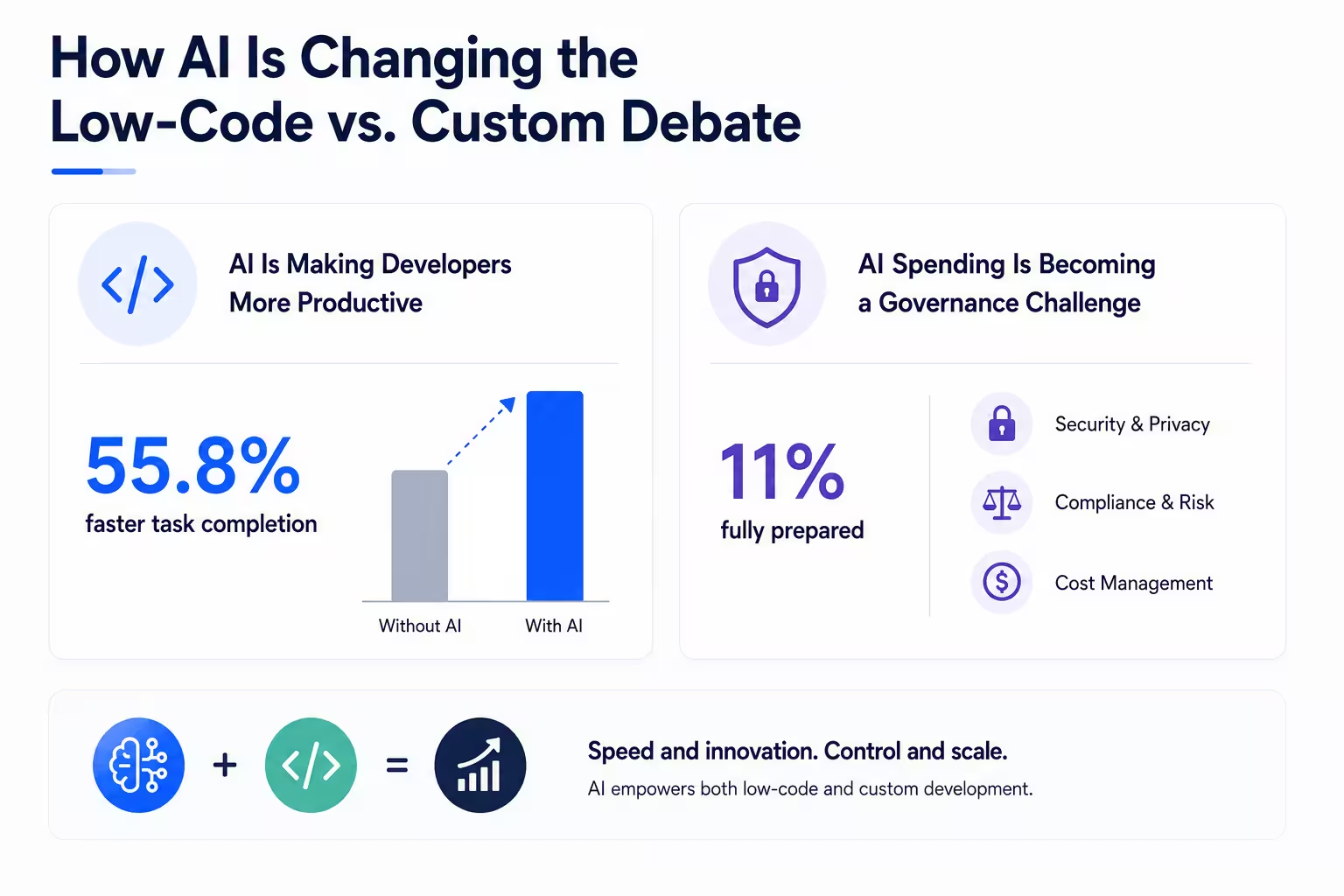
AI Is Making Developers More Productive
One of the most significant impacts of AI has been its ability to accelerate traditional software development.
Modern AI coding assistants can help developers generate code, identify bugs, create documentation, automate testing, and complete repetitive tasks more efficiently. This allows engineering teams to spend less time on routine work and more time solving complex business problems.
The productivity gains are already measurable. According to the GitHub Copilot study, developers using GitHub Copilot completed tasks 55.8% faster than those working without AI assistance.
This is an important shift because one of the traditional advantages of low-code platforms has always been speed.
As AI helps developers deliver software more quickly, some of the historical time-to-market gap between custom development and low-code solutions begins to narrow. Organizations may find that custom software projects can now be delivered faster than previously expected while still providing the flexibility and control associated with traditional development.
This does not eliminate the value of low-code platforms. Instead, it changes the way organizations evaluate trade-offs between speed, customization, and long-term scalability.
AI Spending Is Becoming a Governance Challenge
While AI is creating new opportunities, it is also introducing new operational and governance challenges.
Organizations are rapidly adopting AI tools across development, operations, customer support, analytics, and business processes. As usage expands, leadership teams are increasingly focused on questions surrounding security, compliance, risk management, data privacy, and cost control.
Many organizations are still in the early stages of developing formal governance frameworks for AI adoption. According to the IBM survey, only 11% of CIOs and CTOs report being fully prepared for large-scale AI deployment.
This challenge affects both low-code and custom development environments.
Low-code platforms are rapidly introducing AI-powered features that allow users to generate applications, workflows, and automations with simple prompts. Many leading platforms, including Microsoft Power Apps and OutSystems, are already integrating AI-assisted application generation and workflow automation capabilities. At the same time, custom development teams are integrating AI services directly into products and internal systems.
As AI becomes embedded throughout the software development lifecycle, organizations must think beyond productivity gains alone. Governance, security, cost management, and responsible adoption are becoming just as important as development speed.
The organizations that benefit most from AI will not necessarily be those that adopt it fastest. They will be the ones that combine innovation with strong governance, clear business objectives, and a realistic understanding of the risks and opportunities involved.
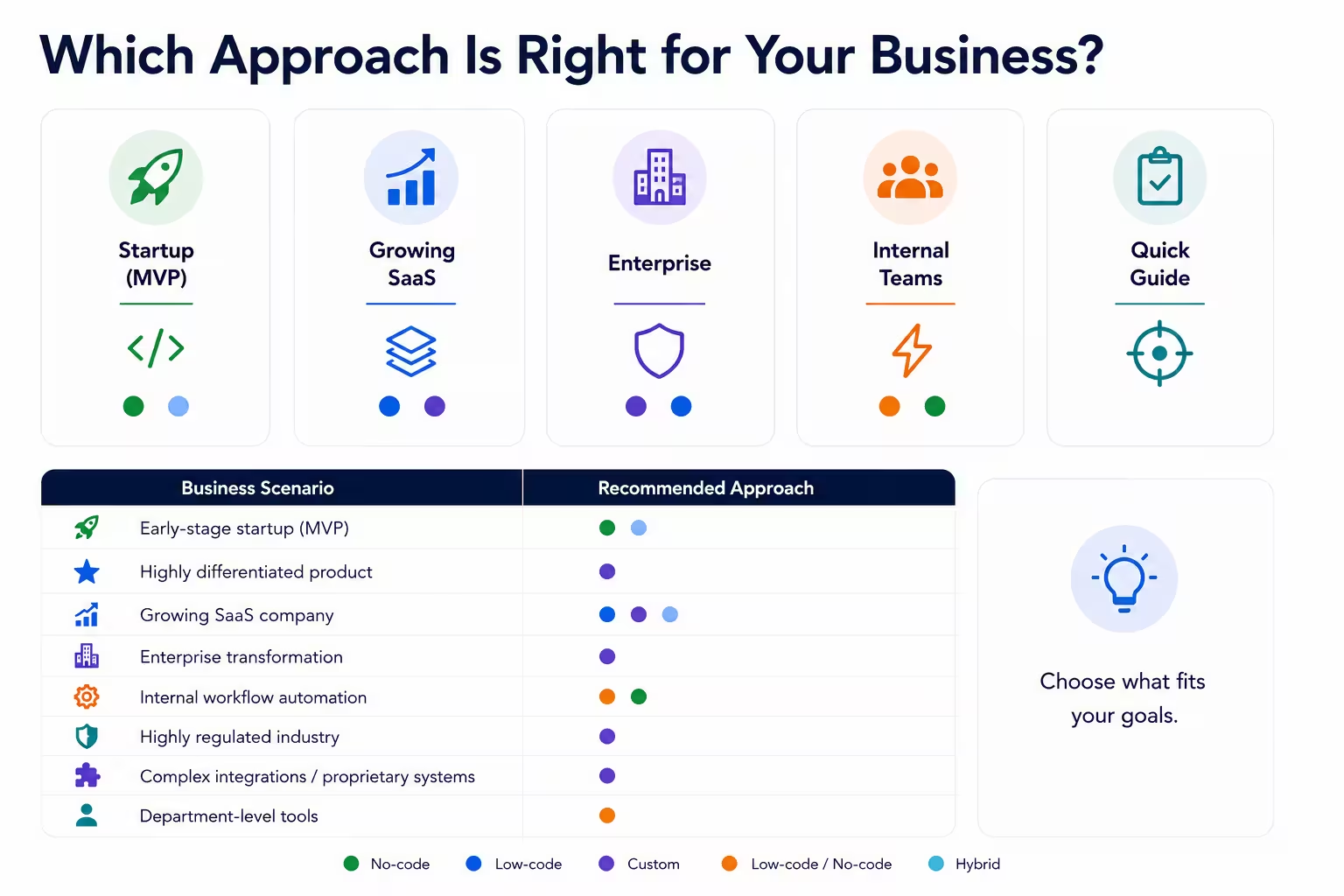
A Decision Framework: Which Approach Is Right for Your Business?
There is no universally correct choice between low-code, no-code, and custom development.
The best approach depends on your organization's goals, available resources, technical requirements, growth expectations, and operational complexity. A solution that works perfectly for one business may create significant limitations for another.
Rather than asking which approach is objectively better, it's often more useful to ask which approach is the best fit for your current stage of growth.
The framework below can help guide that decision.
Startup Launching an MVP
For many startups, speed matters more than perfection.
Early-stage companies are often focused on validating an idea, attracting users, gathering feedback, and proving market demand before making major technology investments. In these situations, low-code and no-code platforms can provide significant advantages.
By reducing development time and upfront costs, founders can launch faster and learn from real users sooner. The goal is not necessarily to build the final version of the product. The goal is to test assumptions and reduce risk.
Recommended approach:
No-code for simple MVPs
Low-code for products that may require future customization
Custom development only when the product itself is the primary competitive advantage from day one
Growing SaaS Company
As SaaS businesses gain traction, their priorities begin to shift.
User growth introduces new challenges related to scalability, performance, security, integrations, and product differentiation. Features that were sufficient during the MVP stage may no longer support growing customer expectations.
At this stage, many companies begin transitioning toward custom development for their core product while continuing to use low-code solutions for internal operations and business processes.
Recommended approach:
Custom development for customer-facing products
Low-code for internal tools and operational workflows
Hybrid architectures where speed and flexibility are both important
Enterprise Organization
Large organizations typically operate within complex technology ecosystems.
Multiple departments, legacy systems, compliance requirements, security controls, and large user bases often create needs that extend beyond the capabilities of many low-code platforms.
This does not mean enterprises should avoid low-code altogether. In fact, many organizations use low-code successfully for departmental applications and process automation. However, mission-critical systems often require the flexibility, governance, and scalability of custom software.
Recommended approach:
Custom development for strategic systems
Low-code for departmental applications and workflow automation
Strong governance to prevent uncontrolled platform sprawl
Internal Operations Team
Not every business problem requires a fully custom solution.
Teams responsible for operations, reporting, project management, customer support, or process improvement often benefit significantly from low-code and no-code platforms. These tools allow departments to solve practical business challenges without competing for engineering resources.
For many organizations, this is where low-code delivers the fastest return on investment.
Recommended approach:
No-code for simple workflows and data management
Low-code for more advanced operational applications
Custom development only when processes become highly specialized or business-critical
Quick Decision Guide
Business Scenario | Recommended Approach |
|---|---|
Early-stage startup validating an idea | No-code or low-code |
Startup building a highly differentiated product | Custom development |
Growing SaaS company | Hybrid approach |
Enterprise digital transformation initiative | Primarily custom development |
Internal workflow automation | Low-code or no-code |
Highly regulated industry | Custom development |
Complex integrations and proprietary systems | Custom development |
Department-level productivity tools | Low-code |
At higroup, this is one of the first conversations we have during the discovery process. The best choice is rarely the most technical option. It's the one that aligns with the company's goals, constraints, and growth plans.
Organizations that make technology decisions based solely on short-term cost or speed often find themselves revisiting those decisions later. The most successful teams evaluate not only where they are today, but also where they expect their business to be in the years ahead.
Budget Considerations: Cost Today vs. Cost Over Time
One of the most common mistakes organizations make when evaluating low-code, no-code, and custom development is focusing exclusively on upfront costs.
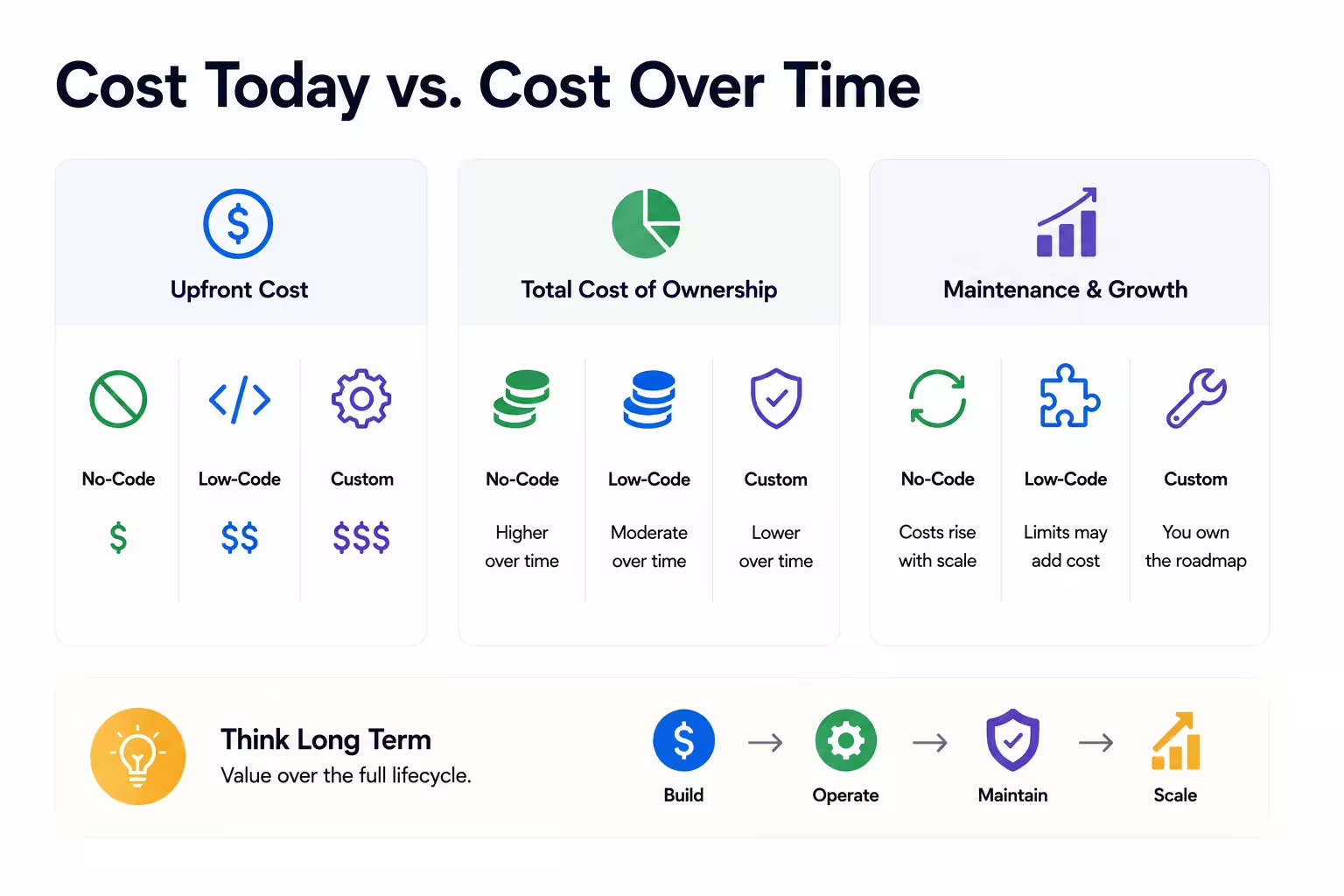
At first glance, the comparison appears straightforward. No-code solutions are typically the least expensive to launch, low-code platforms sit somewhere in the middle, and custom development usually requires the largest initial investment.
However, software decisions should rarely be based on development costs alone.
The real question is not simply what a solution costs today. It is what that solution will cost to build, operate, maintain, and scale over the years ahead.
Initial Development Costs
From a short-term budgeting perspective, no-code and low-code platforms often have a clear advantage.
Organizations can leverage pre-built components, visual development environments, and existing infrastructure to reduce both development time and labor costs. This makes them particularly attractive for startups, MVPs, internal tools, and projects where speed is a priority.
Custom development typically requires a larger upfront investment. Teams must design the architecture, develop functionality from scratch, test the application, and build integrations specific to the organization's needs.
For businesses with limited budgets or uncertain requirements, this initial cost difference can be significant.
However, initial development costs represent only one phase of a software project's lifecycle.
Total Cost of Ownership
A more meaningful metric is total cost of ownership (TCO).
TCO includes not only development expenses, but also licensing fees, infrastructure costs, maintenance, support, security, upgrades, integrations, and operational overhead.
This is where the comparison often becomes more nuanced.
A low-code platform may require a smaller initial investment, but recurring licensing fees can accumulate over time. Additional costs may emerge as user counts grow, automation volumes increase, or advanced platform features become necessary.
Conversely, custom development may require more capital upfront but provide greater control over long-term operating costs.
Neither model is inherently better. The right choice depends on the organization's expected growth trajectory, software requirements, and long-term objectives.
Maintenance and Growth Costs
Software is not a one-time purchase.
Applications must evolve as businesses grow, customer expectations change, and new opportunities emerge. Features are added, integrations expand, security requirements become more sophisticated, and performance demands increase.
This ongoing evolution creates costs regardless of the development approach.
With low-code and no-code platforms, organizations benefit from vendor-managed updates and infrastructure. However, they may also face rising subscription costs and platform limitations as requirements become more complex.
With custom development, businesses assume greater responsibility for maintenance and ongoing improvements. While this requires additional resources, it also provides greater control over priorities, timelines, and future development decisions.
Ultimately, the most cost-effective solution is not always the one with the lowest initial price tag.
Organizations that evaluate software investments through a long-term lens are often better positioned to avoid unexpected expenses, support future growth, and maximize the return on their technology investments. The goal is not simply to minimize development costs. It is to make decisions that create sustainable value over time.
Final Thoughts: Choosing for the Next Stage of Growth
The low-code versus custom development debate is often presented as a question of speed versus flexibility. In reality, the decision is far more nuanced.
No-code, low-code, and custom development each have legitimate strengths. The right choice depends less on the technology itself and more on the context in which it will be used.
For startups validating new ideas, speed and efficiency may be the highest priorities. For growing SaaS companies, scalability and product differentiation often become more important. For enterprise organizations, security, governance, integrations, and long-term control frequently drive technology decisions.
What matters most is aligning your development approach with your business objectives rather than following industry trends or choosing the option with the lowest initial cost.
The organizations that achieve the greatest success are typically those that evaluate software decisions through a long-term lens. They consider not only how quickly a solution can be delivered, but also how it will evolve, integrate, scale, and create value over time.
As AI continues to accelerate software delivery and hybrid development models become increasingly common, the distinction between low-code and custom development will likely become less important than the ability to apply the right approach to the right problem.
Whether you're launching an MVP, modernizing internal operations, or planning a large-scale custom software project, the goal remains the same: building technology that supports the next stage of your company's growth, not just its current needs.
Related post
Handpicked Reads to Deepen Your Understanding
- Business
- Dino Starcic
- 15/06/2026
Software Development Cost and Budgeting Guide in 2026
A practical guide to software development costs in 2026, explaining the key factors that influence project budgets, typical pricing models, hidden expenses, and how businesses can plan their investment more accurately.
Readarticle- Product Engineering
- Dino Starcic
- 01/06/2026
Strategy for Agile Adoption in Business
Adopting Agile is often seen as a quick fix for faster delivery, but in practice, it requires much more than new tools or processes. It’s a shift in how teams work, collaborate, and make decisions. In this blog, we look at what Agile adoption means in a business context, the most common pitfalls, and how to approach it step by step.
Readarticle- Product Engineering
- David Grabnar
- 04/02/2026
What is the Timeline for developing a New Product?
Developing a new product takes time, but the timeline is rarely straightforward. This blog breaks down the typical timeline for product development, from idea validation and design to development, launch, and ongoing support. It explains what influences timelines, where delays usually happen, and how teams can plan realistically to deliver products efficiently without compromising quality.
ReadarticleDo you have a specific idea in mind?
Share your vision, and we'll explore how we can make it happen together.